How Free-Roam VR Works: A Complete Guide
You’ve probably tried VR at home. Maybe you strapped on a headset, swung your arms around, and bumped into the coffee table within 30 seconds. It’s fun, sure. But it’s also limiting. You’re stuck in a tiny square of living room, constantly worried about punching a lamp.
Free-roam VR is a completely different experience. You’re walking, running, crouching, and physically moving through massive virtual worlds with your friends, all without a single cable or boundary guardian ruining the moment. And here in San Diego, venues like San Diego VR are making this technology accessible to everyone, from first-time players to hardcore gamers.
But how does it actually work? What’s happening behind the scenes that lets you walk through a space station, dodge zombie attacks, or solve puzzles in a haunted mansion while you’re really just inside a warehouse in Miramar?
Let’s break it all down.
3 Key Takeaways
Free-roam VR removes every physical barrier: No cables, no small play areas, no stationary controllers. You walk naturally through large arenas while motion tracking translates your real movements into the virtual world in real time.
The technology runs on three core systems: High-precision motion tracking cameras, wireless VR headsets with onboard computing power, and proximity safety sensors all work together to create a seamless, untethered experience.
San Diego has multiple free-roam VR experiences under one roof: San Diego VR in the Miramar area offers Zero Latency, BattleStart VR, VR Cave Escape Rooms, and Hero Zone, giving you four distinct ways to experience free-roam and immersive VR.
What Is Free-Roam VR?
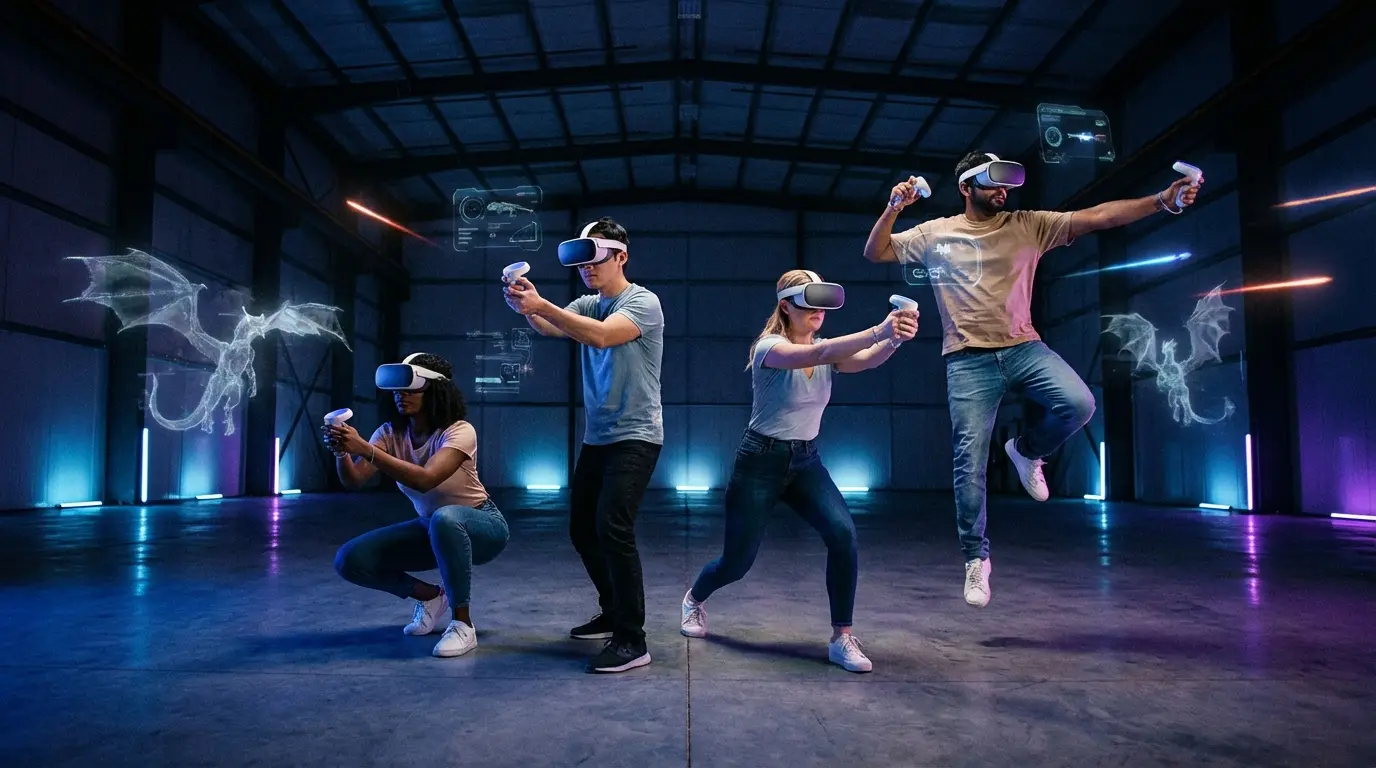
Free-roam VR is a type of virtual reality where you physically walk, run, and move through a large, open arena while wearing a wireless headset. Your real-world movements are tracked and translated into a virtual environment in real time. So when you take a step forward in the arena, your character moves forward in the game. When you duck behind cover, your avatar ducks too.
How It Differs from Home VR
Home VR systems like the Meta Quest or PlayStation VR work great for what they are. But they’re designed for small spaces. You get a few square feet of play area, and the system draws a virtual boundary line to keep you from walking into walls.
Free-roam VR operates on a completely different scale. Arenas can span thousands of square feet, and the technology is purpose-built for full-body movement. There are no boundary lines. No “recenter your view” prompts. You just move.
Why “Free-Roam” Matters
The “free-roam” part isn’t just marketing. It describes the core technical difference. Traditional VR is stationary or semi-stationary. You stand in one spot or walk a few steps. Free-roam VR uses warehouse-scale tracking systems that follow your position across a massive arena, often letting players cover the equivalent of several hundred meters during a single session.
That physical freedom is what makes the experience feel genuinely real. Your brain isn’t fighting the disconnect between “my legs are moving but I’m standing still.” You’re actually walking. And that changes everything about how immersive the experience feels.
How Does Free-Roam VR Technology Work?
The technology behind free-roam VR involves several systems working together simultaneously. Here’s what’s happening every time you step into an arena in San Diego.
Motion Tracking and Positional Awareness
The foundation of free-roam VR is motion tracking. Ceiling-mounted cameras and sensors constantly monitor the position and orientation of every player in the arena. These aren’t standard webcams. They’re high-precision tracking systems that capture your movements and translate them into the virtual world with virtually zero delay.
The tracking system captures your physical location in the arena and maps it to your avatar’s position in the game. When you walk, crouch, lean, or turn your head, the system registers those movements in real time. This is what makes the experience feel natural. You’re not pressing a joystick to move your character. Your body is the controller.
Wireless Headsets and Computing Power
One of the biggest differences between free-roam VR and home setups is how the computing happens. In home VR, your headset is either tethered to a PC or running everything on a mobile processor built into the headset itself. Both approaches come with trade-offs in either mobility or graphical quality.
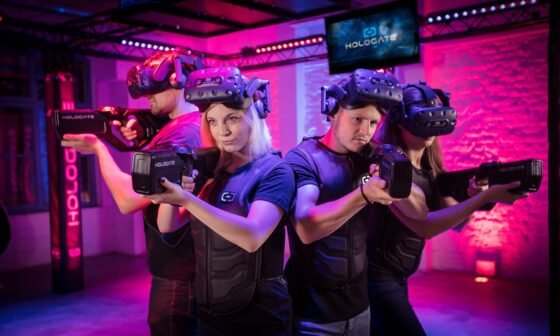
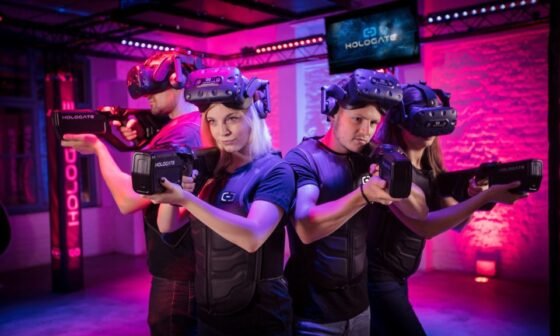
Free-roam VR systems solve this in different ways depending on the platform. Some systems use lightweight, self-contained headsets with onboard processing. Others rely on small backpack computers that power high-fidelity visuals without any cables connecting you to a wall or ceiling. Either way, you’re completely wireless. Nothing is tethering you to a fixed point.
The result is console-quality (or better) graphics with full freedom of movement. That’s a combination you simply can’t replicate at home right now.
Proximity Safety Systems
Here’s something most people don’t think about until they’re in the arena: when six or eight people are running around the same physical space while seeing completely different virtual environments, how do they avoid crashing into each other?
The answer is proximity sensors. Free-roam VR systems use real-time player tracking to monitor distances between all players and between players and walls. When you get too close to another player or the edge of the arena, the system sends a visual warning in your headset. You might see a subtle grid or boundary indicator that tells you to adjust your path.
It works seamlessly. Most players never even realize they’re being guided away from potential collisions. And there’s always a trained game master monitoring the session from outside the arena, watching player positions and ready to pause the game if needed.
What Free-Roam VR Experiences Are Available in San Diego?
San Diego VR at 8604 Miramar Road is the city’s dedicated VR entertainment venue, and it’s exclusively focused on virtual reality. That means every square foot of the facility is designed for VR experiences. Here’s what you’ll find inside.
Zero Latency: The Arena-Scale Experience
Zero Latency is the flagship free-roam VR platform at San Diego VR. It supports up to eight players simultaneously in a massive arena where you can physically walk through expansive virtual worlds.
The game library includes cooperative missions where your team fights through zombie outbreaks, explores space stations overtaken by rogue AI, and survives undead arenas. Titles like Outbreak, Space Marine, and Undead Arena offer different intensity levels, so there’s something whether you want a lighthearted puzzle experience or an adrenaline-pumping survival mission.
Zero Latency sessions typically last 30 to 60 minutes depending on the package, and every session starts with a briefing where the staff walks you through the equipment and controls.
BattleStart VR: Party Mode and Tactics Mode
BattleStart VR is a newer free-roam VR platform at San Diego VR that offers two distinct play styles.
Party Mode is designed for all ages (8+) and features a collection of mini-games. Think guiding baby penguins home, dance competitions, Wild West shooting galleries, and mining for diamonds. It’s chaotic, it’s fun, and it’s perfect for birthday parties or family outings in San Diego.
Tactics Mode is the competitive side. It’s a team-based tactical shooter experience with objective-based gameplay, loadouts, and game modes that feel similar to paintball or games like Call of Duty. If your group wants strategy and competition, this is where you go.
BattleStart supports up to eight players in the arena and sessions run about 30 to 45 minutes including briefing and gear-up time. No prior VR experience is needed for either mode.
VR Cave Escape Rooms
VR Cave takes the escape room concept and removes every physical limitation. Instead of being locked in a room with padlocks and combination codes, you’re transported into fully realized virtual environments. Haunted mansions, futuristic laboratories, dragon towers, pirate ships, alien-infested space stations. The scenarios are far more elaborate than anything a physical escape room could build.
Teams of two to six players work together to solve puzzles, uncover clues, and escape before time runs out. It’s collaborative, creative, and works great for groups that prefer brainpower over firepower. Players ages 10 to 12 should be accompanied by an adult.
Hero Zone VR Arcade
Hero Zone rounds out the experience lineup at San Diego VR with shorter, more arcade-style VR sessions. It’s perfect for groups that want a quick taste of VR without committing to a full session, or as an add-on after a longer Zero Latency or BattleStart experience.
Up to four players can compete simultaneously in action-packed multiplayer battles, team challenges, and replayable games. Think of it as the appetizer before the main course, or the perfect option for younger kids or players who want something fast-paced and immediate.
What to Expect During Your First Free-Roam VR Session
If you’ve never done free-roam VR before, here’s a step-by-step walkthrough of what your visit to San Diego VR will look like.
Before You Arrive
Book your session in advance, especially on weekends. Walk-ins are welcome, but reservations guarantee your time slot. Wear comfortable clothes and flat-soled shoes. Sneakers or athletic shoes work best. Leave the flip-flops at home.
If you wear glasses, the venue recommends wearing contacts instead, as glasses can scratch the headset lenses. If contacts aren’t an option, ask the staff for guidance when you arrive.
The Briefing
Every session starts with a brief orientation. A staff member will explain the equipment, show you how to put on the headset and hold the controller, and walk you through the game mechanics. They’ll also cover the safety systems and what to do if you need to pause or stop.
This usually takes about five to ten minutes. Even if you’re an experienced VR player, the briefing is worth paying attention to because each platform has its own controls and quirks.
Gear Up and Play
Once you’re briefed, you’ll gear up. Depending on the platform, this means putting on a wireless headset and picking up a controller (for newer systems like BattleStart) or strapping on a lightweight backpack computer with a headset and blaster (for Zero Latency).
Then you step into the arena and the real world disappears. You’ll see your teammates as avatars, your virtual weapons in your hands, and an entire digital world stretching out around you. From here, it’s all gameplay. Move naturally, communicate with your team, and enjoy the experience.
After the Session
Sessions typically end with a debrief and a chance to see your stats, scores, or highlights. It’s a great time to take group photos and book your next session, because almost everyone immediately wants to try a different game.
Practical Info for Visiting San Diego VR
Here’s everything you need to know about planning your trip.
Location and Hours
San Diego VR is located at 8604 Miramar Road, Suite A, San Diego, CA 92126. That’s in the Miramar area, easily accessible from I-15 with plenty of parking.
Current hours run Wednesday through Friday from 3:00 PM to 9:30 PM, Saturdays from 11:00 AM to 9:30 PM, and Sundays from 11:00 AM to 6:00 PM. Check the website for holiday hours or special event schedules.
Group Events and Parties
San Diego VR is a popular destination for birthday parties, corporate team-building events, and group outings. They offer event packages that include private rooms, catering options (pizza and sandwiches starting at $12 per person, or bring your own food), and customizable VR experiences.
The event room is available for $50 for cake cutting and catering setups, with a minimum of six players required to reserve. Booking fills up fast, especially for weekend parties, so plan ahead.
Age Requirements
Most experiences are suitable for ages 8 and up. VR Cave Escape Rooms recommend adult accompaniment for players ages 10 to 12. Some Zero Latency games with more intense themes (horror, zombie survival) may be better suited for teens and adults. The staff can help you choose the right experience for your group’s age range.
Tips for Getting the Most Out of Free-Roam VR
Move Naturally
The biggest mistake first-timers make is moving cautiously. The tracking system works best when you move like you normally would. Walk at your natural pace. Turn your whole body instead of just your head. Crouch behind cover. The more you commit to natural movement, the more immersive the experience becomes.
Communicate with Your Team
Free-roam VR is a social experience. You can hear and talk to your teammates while you play. Call out enemy positions, coordinate strategies, and work together on puzzle solutions. The groups that communicate most consistently have the best time.
Try Multiple Experiences
Don’t just stick with one game. San Diego VR has four different VR platforms under one roof, and each one offers something different. Start with Zero Latency or BattleStart Party Mode to get comfortable, then graduate to Tactics Mode or VR Cave for a different kind of challenge.
Dress for Movement
You’re going to be physically active. Wear breathable clothes and shoes you can move in. You’ll be walking, crouching, reaching, and possibly running depending on the game. It’s not a workout exactly, but it’s more physical than sitting on your couch.
What Makes San Diego VR Different from Other VR Venues?
Exclusively VR, Under One Roof
A lot of entertainment venues tack on a single VR station as an afterthought. San Diego VR is 100% dedicated to virtual reality. That means the entire facility, every room, every arena, every piece of equipment, is designed and optimized for VR experiences. You’re not competing for attention with go-karts or laser tag. VR is the focus, and the quality reflects that.
Four Distinct Platforms
Having Zero Latency, BattleStart VR, VR Cave, and Hero Zone all in one location means you get more variety in a single visit than most venues offer in their entire existence. Want cooperative team survival? Zero Latency. Competitive tactical shooting? BattleStart Tactics Mode. Puzzle-solving with your family? VR Cave. Quick arcade fun? Hero Zone.
500+ Five-Star Google Reviews
San Diego VR has earned over 500 five-star reviews on Google since opening in June 2024. That kind of consistent feedback speaks to the quality of the experiences, the staff, and the overall venue.
San Diego’s Go-To for Groups
Whether you’re planning a San Diego birthday party, looking for team-building activities in San Diego, or just want a unique night out in the Miramar area, San Diego VR has built a reputation as the top destination. Custom event packages, private rooms, and catering options make it easy to plan any kind of gathering.
Frequently Asked Questions
Do I need any VR experience to try free-roam VR?
Not at all. Every session begins with a full briefing where the staff walks you through the equipment and game controls. The systems are designed to be intuitive, so even complete beginners can jump in and have a great time within minutes.
Can I wear glasses during a free-roam VR session?
The headsets can accommodate most glasses. However, San Diego VR recommends wearing contacts if possible, as glasses can potentially scratch the headset lenses. If you must wear glasses, let the staff know and they’ll help you get a comfortable fit.
How many people can play free-roam VR at the same time?
It depends on the platform. Zero Latency and BattleStart VR both support up to eight players simultaneously in the arena. VR Cave accommodates two to six players. Hero Zone supports up to four at a time.
Is free-roam VR safe for kids?
Yes. Most experiences are appropriate for ages 8 and up, and the safety systems (proximity alerts, boundary warnings, live game master monitoring) are always active. Party Mode on BattleStart VR is specifically designed to be fun and non-aggressive for younger players. For VR Cave, kids ages 10 to 12 should be accompanied by an adult.
How long does a typical session last?
Sessions range from about 30 minutes for shorter experiences (Hero Zone, BattleStart) to 60 minutes for full Zero Latency missions. Factor in an additional 10 to 15 minutes for briefing and gear-up time.
What should I wear to a free-roam VR session?
Comfortable, breathable clothing and flat-soled shoes. Sneakers or athletic shoes are ideal. Avoid sandals, heels, or anything restrictive. You’ll be physically moving around, so dress like you’re going to be active.
Related Articles
- Discover the Ultimate Virtual Reality Experience at San Diego VR
- Experience the Future of Escape Rooms with San Diego VR
- San Diego VR: Celebrating 500+ Five-Star Google Reviews
- BattleStart VR at San Diego VR
San Diego VR is located at 8604 Miramar Rd, Suite A, San Diego, CA 92126. Call (858) 396-0009 or visit sandiegovr.com to book your session.